Download coming soon. Taskcribe arrives in the next few days, also on the Microsoft Store.

Everything Taskcribe does for your meetings

Bot-free recording, transcription on your PC, minutes ready in PDF and Word, and tasks with owner and due date straight on your team's board.

Tasks go where your team already works

  • Jira
  • Trello
  • Asana
  • Notion
  • ClickUp
  • Todoist
  • GitLab
  • GitHub
  • Azure DevOps
  • Linear
  • Excel (CSV)
Features

Built for people who leave meetings with things to do

No more rewriting notes or chasing down who owns what.

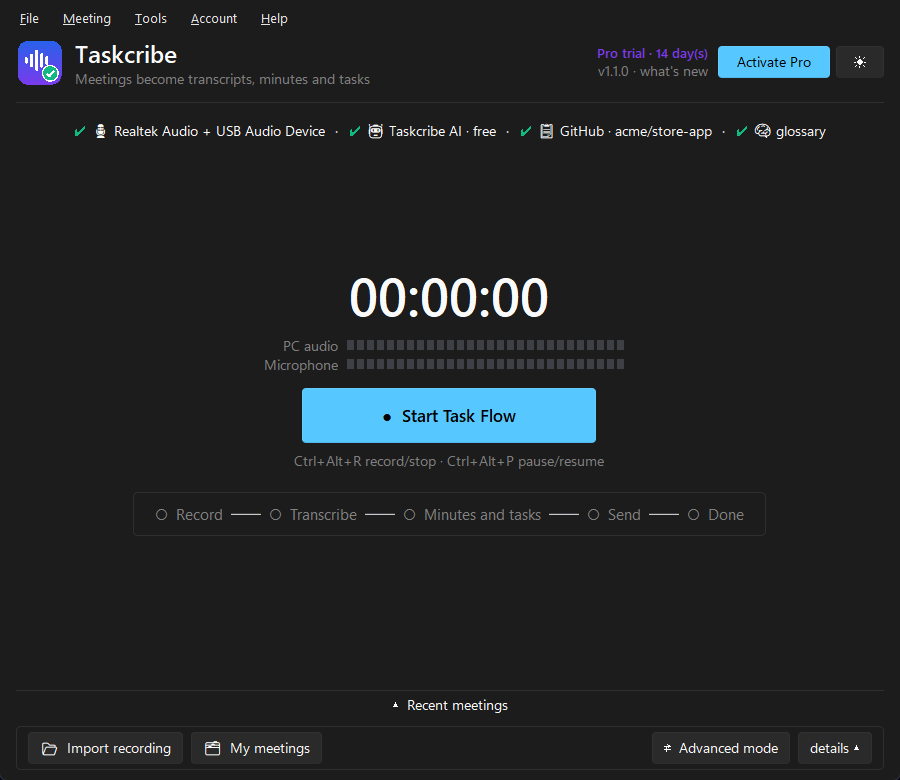
Taskcribe home screen: at the top, a summary of the setup (PC sound and microphone, free Taskcribe AI, GitHub and glossary), the timer and the Start Task Flow button.
Record

No bot on the call. No third-party cloud.

Typical tools drop a bot into your meeting and ship the audio off somewhere. Taskcribe records right on your PC, quietly.

  • Teams, Meet, Zoom, Slack, WhatsApp… anything that plays on your PC
  • Shortcuts that work with the app minimized (Ctrl+Alt+R records, Ctrl+Alt+P pauses)
  • Tray icon by the clock and Windows notifications as each step finishes
  • Already have a recording? Import video or audio and the flow runs the same
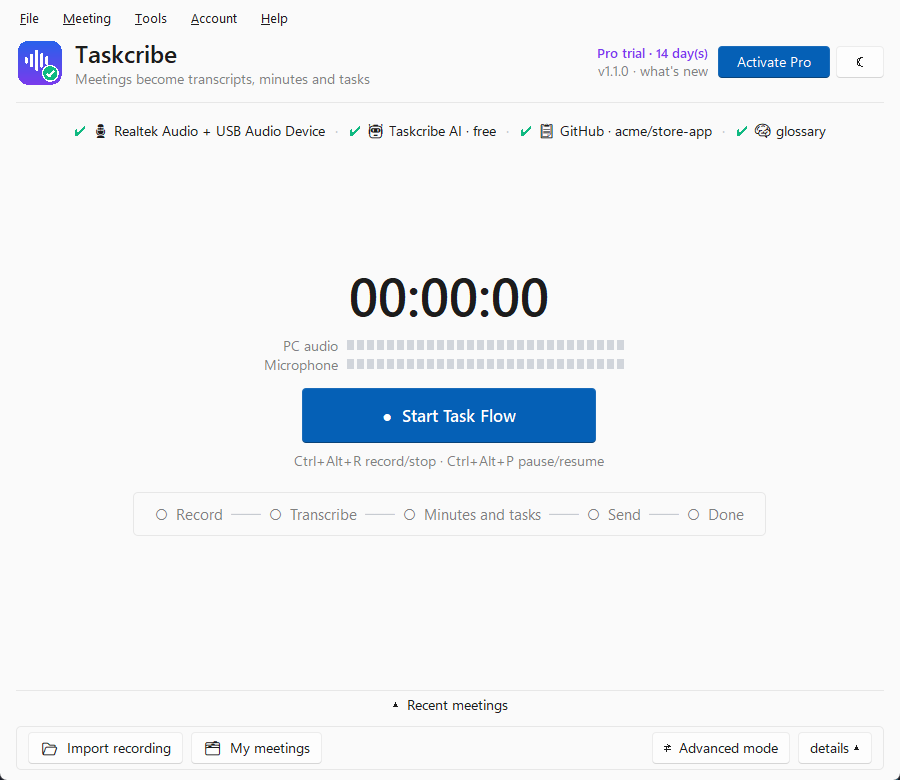
Taskcribe in light theme, showing the same home screen.
Transcribe

Transcription on your PC, no per-minute fees

The transcription model (Whisper) runs on your computer. It works offline, with no minute limits on Pro.

  • Identifies who spoke: Speaker 1, Speaker 2…
  • Portuguese, English and Spanish, or let it detect the language
  • Runs at low priority, so Teams and Excel don't freeze
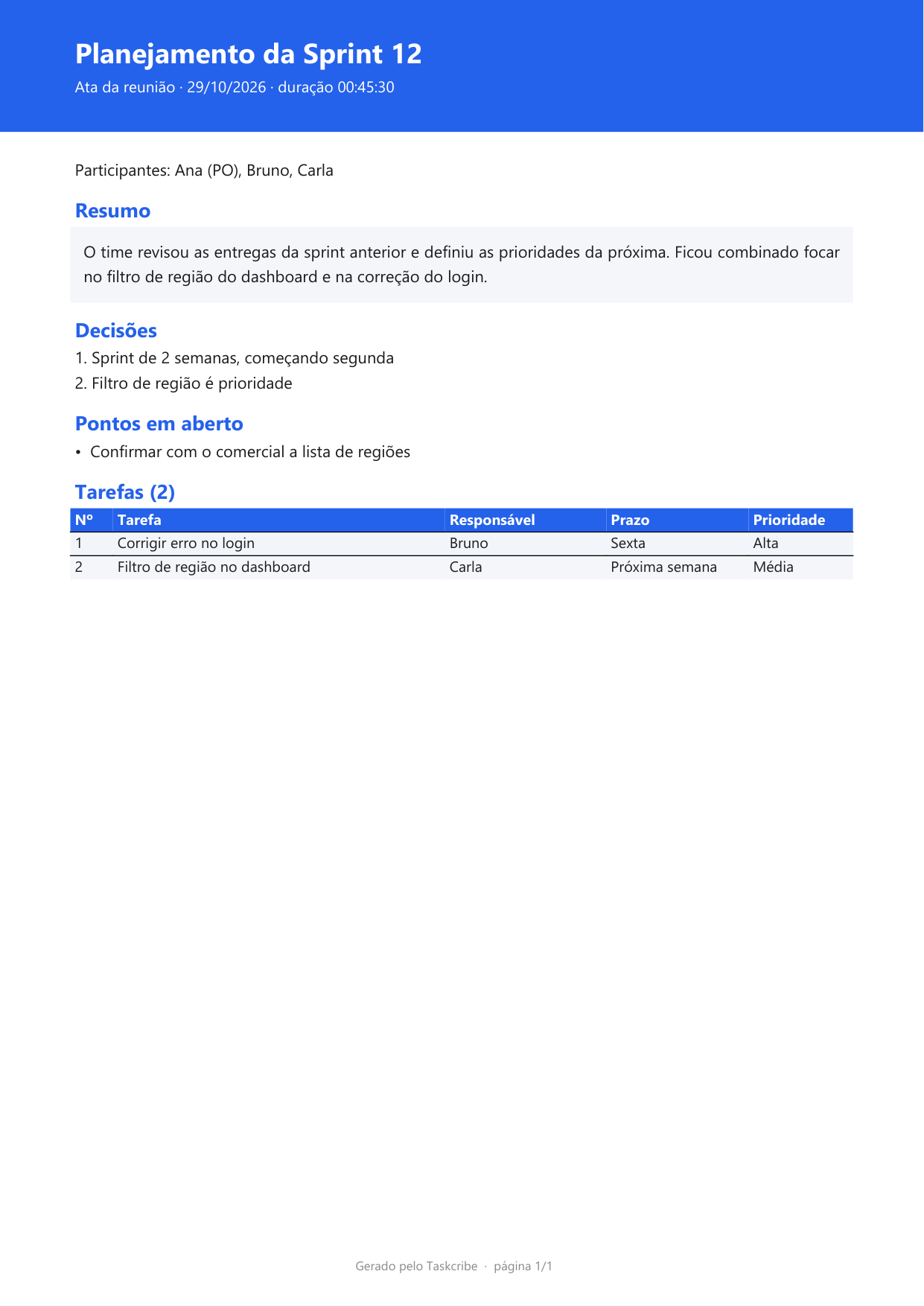
Sample PDF minutes generated by Taskcribe: titled Sprint 12 Planning, with attendees, summary, decisions, open items and a task table with owner, due date and priority.
Minutes

Minutes come out ready, in PDF and Word

Summary, attendees, decisions, open items and the task table. Ready to send by email or WhatsApp.

  • 3 ready-made templates: Executive, Formal (with signatures) and Compact (1 page)
  • Or use your company's Word template
  • Every meeting gets its own folder, named by the AI
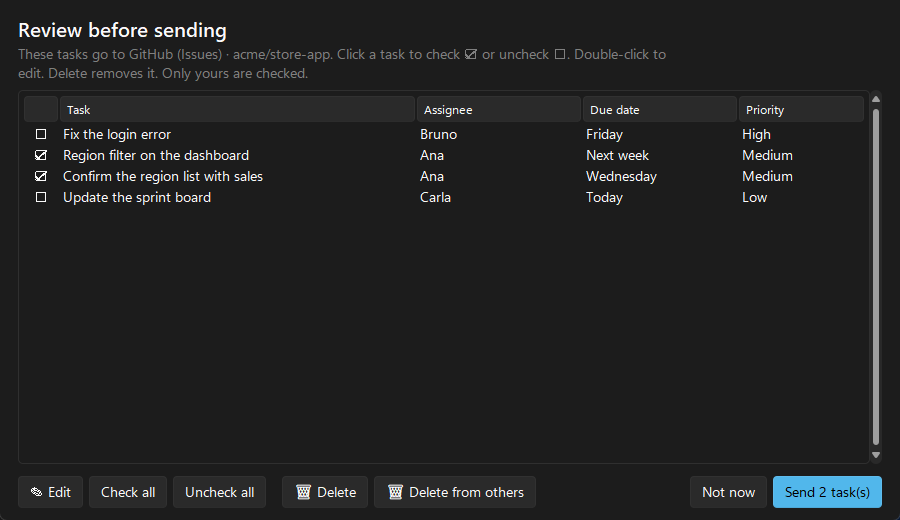
Review before sending screen: four tasks with owner, due date and priority; Ana's two come pre-selected. Buttons for Edit, Select all, Deselect all, Delete, Delete others' and Send 2 tasks.
Review

You check it before anything hits the board

Tasks that are yours come pre-selected. One click selects or deselects, a double-click edits.

  • “Delete others'” clears out everything that isn't yours in one go
  • Each task includes what to do, how to do it and the minute in the recording where it was agreed
  • Rather skip the review? Turn it off and go fully automatic
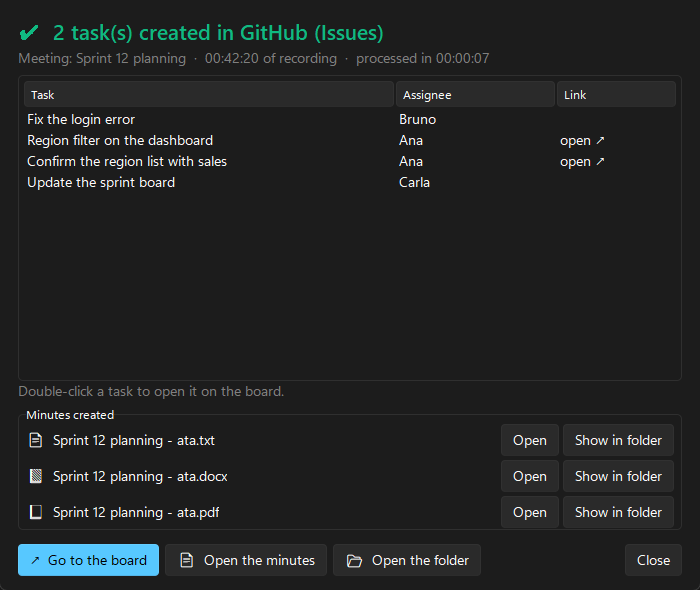
Task Flow complete window: 2 tasks created in GitHub Issues, each with a link to open it, and the list of generated minutes in txt, Word and PDF.
Send

Tasks straight to your team's board

At the end, you see what was created, with a link to every task and the minutes ready to open.

  • Jira, Trello, Asana, Notion, ClickUp, Todoist, GitLab, GitHub, Azure DevOps and Linear
  • Or save a spreadsheet (CSV) that opens in Excel
  • If something fails, it tells you why and lets you resend with one click
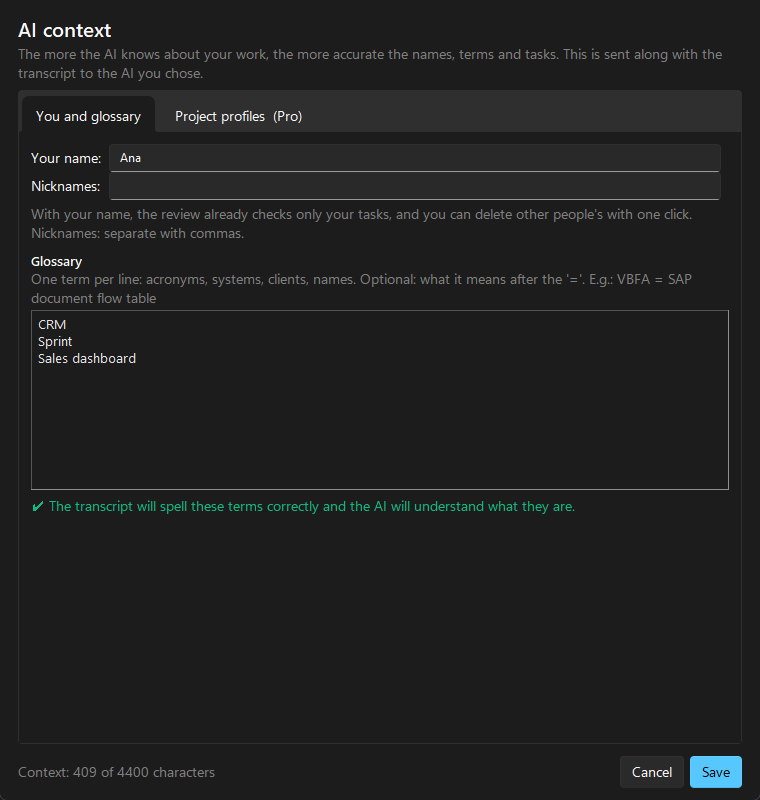
AI context window: Your name field, nicknames and a glossary with the terms CRM, Sprint and Sales dashboard; Project profiles tab.
Context

It learns your company's lingo

Add acronyms, systems, clients and names to the glossary. The transcript spells them right and the AI gets what you're talking about.

  • With your name, it knows which tasks are yours
  • Per-project profiles: team, rules and sample tasks (Pro)
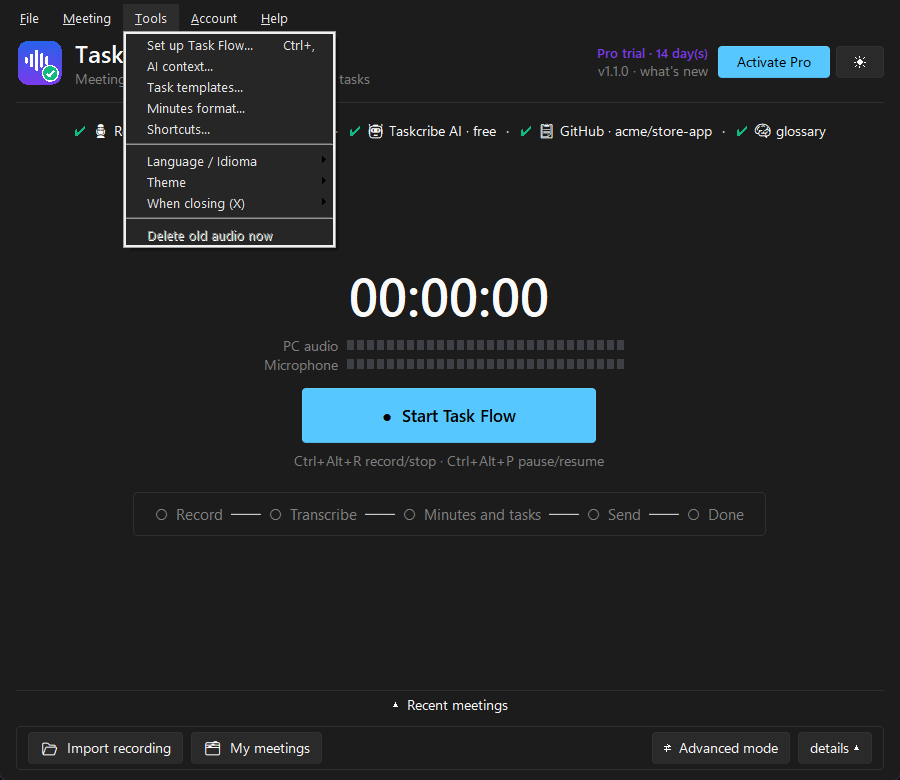
Taskcribe's menu bar with the Tools menu open: Set up Task Flow, AI context, Task templates, Minutes format, Shortcuts, Language / Idioma and Theme.
Menus and languages

Everything at hand, in English or Portuguese

A menu bar like the apps you already use: every feature one click away, no hunting for buttons.

  • File, Meeting, Tools, Account and Help, in light or dark theme
  • Keyboard shortcuts: Ctrl+O imports a recording, Ctrl+, opens settings, F1 contacts support
  • App in English or Portuguese: choose it when you install or in Tools → Language
  • Meetings in English, Spanish or Portuguese: the minutes and tasks come out in the meeting's language
Artificial intelligence

Free AI built in. Or bring your own.

No account to create, no key to paste to get started.

Taskcribe AI free

Comes preconfigured. Writes the minutes and tasks for up to 3 meetings a day (10 a month) on the Free plan and 10 a day (120 a month) on Pro.

On your PC

With Ollama or LM Studio, the AI runs on your computer and nothing leaves it.

With your own key or subscription

Gemini, Groq, ChatGPT, Claude, Grok, DeepSeek, Mistral, OpenRouter, GitHub Models. Have a Claude subscription? You can use that too.

Taskcribe AI Gemini Groq GitHub Models Ollama LM Studio ChatGPT Claude Grok DeepSeek Mistral OpenRouter

Gemini, Groq and GitHub Models offer limited free use with your own account. The others are pay-as-you-go, billed directly by the provider. Taskcribe charges nothing extra for any of it.

The details

Designed for everyday use

Never lose a meeting

If the internet drops or the AI fails, the recording is kept safe. One click on ✖ picks up right where it stopped.

Recent meetings

History on the home screen: open the minutes, folder or tasks of any meeting.

Shortcuts and pause

Record and pause without opening the app. Shortcuts are customizable, even to a mouse button.

PT · EN · ES

Meeting in English? The minutes and tasks come out in the meeting's language.

Cleans up on its own

Deletes old audio after 30, 60 or 90 days. Minutes and tasks stay.

All in your own files

Transcripts, minutes and tasks live in Documents, in one folder per meeting.

Questions about the app

What is Taskcribe?

Taskcribe is a Windows app that turns meetings into minutes and action items automatically. It records Teams, Google Meet or Zoom straight from your PC, with no bot on the call, transcribes the audio on your own computer (using Whisper) and uses AI to write the meeting minutes in PDF and Word and the tasks with owner and due date, sending them to Jira, Trello, Asana, Notion, ClickUp, GitHub, GitLab, Azure DevOps, Linear or Todoist.

Is the app in English?

Yes. Taskcribe is in English and Portuguese: pick the language when you install or later in Tools → Language. Meetings can be in English, Spanish or Portuguese, and the minutes and tasks come out in the meeting's language.

Does it work on Mac or Linux?

For now, Windows 10 and 11 (64-bit) only.

How big is the download? Can my PC handle it?

The installer is about 120 MB and downloads the transcription model (1.6 GB) during installation, just once. It runs on PCs with 8 GB of memory (16 GB recommended); the faster the processor, the faster the transcription. See the requirements. The app lets you know when a new version is out.

Your next meeting can turn into tasks.

Download free and try Pro for 14 days. No credit card.